

Database seeding is the process of populating a database with its initial set of rows, the reference data, demo accounts and test fixtures an application expects to find in a schema the migrations have only just built.
If you've ever written an INSERT statement into a file called seed.sql or seed.ts, you've done it. The mechanism varies (a raw SQL file, an ORM seeder, a factory, a generator that reads the live schema) while the job behind it does not. Whichever one you pick, the next migration is what eventually breaks it. Starting at that file, this guide works forward through the alternatives, including the database part of vibe coding, where an AI tool scaffolds the whole app but leaves the seed file to you, and it ends on Seedfast, which reads the live Postgres schema on every run and generates the rows from what it finds there.
Anyone already past the "what is it" stage and comparing concrete tools (Laravel vs Prisma vs Drizzle vs standalone seeders) can skip ahead to the database seeder tool comparison.
Key Takeaways
- Database seeding starts simple (a SQL file) and gets complicated fast as schemas grow; the problem isn't generating values, it's keeping seed data valid across migrations
- Every major ORM has a built-in seeder (Prisma, Laravel, EF Core), but the data and relationships are defined manually, which means they break on schema changes just like raw SQL
- Keeping foreign keys valid is what makes seeding hard at scale. Let the dependency chain run four levels deep and a hand-written insert file stops holding up, while Seedfast returns a dataset whose referential integrity already holds
- When the seed file itself becomes the bottleneck, generation is the next step. Seedfast reads the current Postgres schema on every run, so the dataset follows your migrations instead of lagging a sprint behind them
What Is Database Seeding?
Database seeding is the process of populating a database with an initial set of data. The term comes from agriculture, where nothing grows until something is planted, and in databases it means inserting a starting dataset so the application has something to work with, whether that's three admin users for local development, a thousand products for a staging demo, or a connected dataset across 40 tables for integration tests.
There are two kinds of seed data, and teams routinely conflate them. Reference data lives in production and covers roles, categories, feature flags, country codes, and default settings; it's part of the application's contract and changes rarely. Development and test data is the opposite, fake users and sample orders that exist only outside production. Getting that fabricated data to cohere across columns is its own problem, and what Faker-style generation misses is where hand-written fixtures look plausible without holding up.
The confusion starts when teams use one mechanism for both. A seed.sql that inserts admin roles AND a thousand fake users couples two things that change at completely different rates, the roles almost never and the fake users constantly, so every later migration has to drag both through the same increasingly brittle file.
Why Seed a Database?
A freshly migrated database has tables but no rows. Every dashboard renders an empty state, every list view returns nothing, and every test that depends on a user or a product fails before it starts. Seeding solves three concrete problems at once:
- Local development gets a populated UI, so new devs can click through real flows on day one instead of staring at empty tables.
- Integration and end-to-end tests get data to assert against, since a test that checks "user sees their last 10 orders" needs 10 orders in the database before it runs.
- Production gets the reference rows the app needs to boot cleanly; without them the application won't start on day one.
Skip it and every developer writes the same INSERT statements by hand, every CI run starts from a different database state, and onboarding degrades into "ask Marcus for a dump".
Database Seeding vs Database Migration
Migrations and seeds are often confused because they both run against the database before the application does. They are not the same thing.
| Migration | Seed | |
|---|---|---|
| What it does | Changes structure (tables, columns, indexes) | Inserts data |
| Versioned? | Yes — strict order | No — should be idempotent |
| Runs in production? | Always, on every deploy | Reference data only; never test data |
| Repeatable? | Each migration runs once | Should produce the same end state on every run |
The rule of thumb is that if you'd lose work without it, it's a migration, and if you'd lose realism without it, it's a seed. Mixing the two, whether that's test data inside a migration or schema changes inside a seed, tangles deploys in ways that surface at the worst possible moment.
Starting Simple: the seed.sql File
Every database seeding journey starts here:
INSERT INTO roles (id, name) VALUES
  (1, 'admin'), (2, 'editor'), (3, 'viewer');

INSERT INTO teams (id, name) VALUES
  (1, 'Engineering'), (2, 'Design');

INSERT INTO users (id, email, team_id, role_id) VALUES
  (1, 'alice@example.com', 1, 1),
  (2, 'bob@example.com', 2, 2);
Run it with psql -f seed.sql and your database has data, deterministically and under version control. For a 5-table schema that changes quarterly, this is fine. For writing a Postgres seed file from scratch, see Seed Database: PostgreSQL Step-by-Step Guide; for the failure modes that quietly break one, from FK ordering and idempotency to the migration that invalidates it, see Postgres Seed Script: Build One That Lasts.
The trouble starts the day someone runs ALTER TABLE users ADD COLUMN department_id INTEGER NOT NULL REFERENCES departments(id). The seed file doesn't insert departments, so the INSERT into users fails, and someone has to fix it, test it, and commit it. Multiply that across 30 tables and monthly migrations, and the maintenance cost becomes its own workstream.
How ORMs Handle Database Seeding
Every major ORM ships a seeding mechanism. The syntax varies from one framework to the next, but the pattern underneath is identical, since you're writing code that creates records through the ORM's API.
Prisma puts seeds in a TypeScript file:
import { PrismaClient } from "@prisma/client";
const prisma = new PrismaClient();

async function main() {
  const team = await prisma.team.create({
    data: { name: "Engineering" },
  });

  await prisma.user.create({
    data: {
      email: "alice@example.com",
      team: { connect: { id: team.id } },
    },
  });
}

main()
  .then(async () => {
    await prisma.$disconnect();
  })
  .catch(async (e) => {
    console.error(e);
    await prisma.$disconnect();
    process.exit(1);
  });
// Register the script under `prisma.seed` in package.json or prisma.config.ts,
// then run: npx prisma db seed
Laravel uses seeder classes:
// database/seeders/DatabaseSeeder.php
public function run(): void
{
    $team = Team::create(['name' => 'Engineering']);

    User::create([
        'email' => 'alice@example.com',
        'team_id' => $team->id,
    ]);
}
// Run: php artisan db:seed
EF Core (version 9 and later) uses UseSeeding and UseAsyncSeeding on the DbContext:
protected override void OnConfiguring(DbContextOptionsBuilder optionsBuilder)
{
    optionsBuilder
        .UseSqlServer(connectionString)
        .UseSeeding((context, _) =>
        {
            if (!context.Set<Team>().Any())
            {
                context.Set<Team>().Add(new Team { Name = "Engineering" });
                context.SaveChanges();
            }
        })
        .UseAsyncSeeding(async (context, _, ct) =>
        {
            if (!await context.Set<Team>().AnyAsync(ct))
            {
                context.Set<Team>().Add(new Team { Name = "Engineering" });
                await context.SaveChangesAsync(ct);
            }
        });
}
// Triggered automatically by EnsureCreated / Migrate, or manually via context.Database.EnsureCreated()
EF Core's older HasData API is now classified as "model managed data"; Microsoft recommends UseSeeding for general-purpose seeding because HasData runs as part of migrations and couples schema changes with row inserts.
ORM seeders improve on raw SQL. Typed languages like TypeScript and C# catch errors at compile time, the seed code lives alongside your app, and the ORM wires direct relationships through its own API.
The core problem survives, though. Data and relationships are still defined by hand, so a migration that adds a required column or changes a relation breaks the seeder the same way a seed.sql breaks, only in TypeScript or PHP or C#. You're also locked to one ORM, since a Prisma seed can't be reused if half your team runs Drizzle, and going the other way hits the same wall, because drizzle-seed reads a Drizzle schema object rather than the database it writes to. Straddling two ORMs is what sends teams looking for a drizzle-seed alternative that isn't tied to one ORM. For a side-by-side of 7 database seeder tools on FK resolution and schema drift, see the database seeder tool comparison.
When Seeding Stops Being Simple
Most teams hit a wall around 15-20 tables, sometimes at the dependency chain, sometimes at circular references, and usually at all of them in the same week.
The dependency chain gets deep. To insert an order_item you need an order, a product, and a price; the order needs a user and a shipping_address, and the product needs a category and a vendor. That's three or four levels of dependency for a single line item, and the seed code becomes more about wiring IDs together than about the data itself. A column-level generator does not take that work away either, because it builds from column definitions rather than from the foreign keys already in your schema, so you get an orders.csv and a products.csv and still have to match the IDs between them, which is the gap a Mockaroo alternative that keeps foreign keys valid has to close.
Circular references show up next, and they're worse. A user carries a manager_id that points at another user, a category has a parent_category_id, and an employee belongs to a department whose own head_employee_id points back at an employee. Neither side can be inserted first, so a straight top-to-bottom insert fails outright, and getting it right by hand turns into fiddly, error-prone work. Deferring the constraint check to commit time is the usual way out, and seeding a circular foreign key works through that pattern and two others against a schema that has the loop in it.
Then migrations keep breaking the seeds. Every NOT NULL column, every new FK constraint, every renamed table sends someone back to the file, and on a codebase with weekly migrations seed maintenance becomes a recurring tax nobody budgets for, until the file stops working and a known-good dump gets passed around instead.
By now most teams either live with broken seeds, copy production (which can carry compliance considerations), or start comparing the best Postgres test data generators and best AI test data generators. When the data is meant for a sales demo, a trial sandbox, or an investor walkthrough rather than a test run, a demo data generator is the closer fit. Some arrive already carrying an orphaned generator, shopping for a Snaplet Seed alternative after the 2024 shutdown left the fork stalled, or a Neosync alternative after the 2025 archive, and they end up weighing the same options.
Real Schemas, by the Numbers
The 15-20 table wall isn't folklore. Seedfast has seeded 188 Postgres schemas since November 2025, and that run metadata, aggregated in August 2026, puts numbers on where real projects actually sit.
- Seedfast finds a median of 11 tables per schema, and a quarter of the schemas it seeds carry 25 or more. Roughly a third cross the 20-table mark, and the largest reached 248. That upper quarter is squarely the territory where hand-wired dependency chains stop being worth maintaining.
- A typical seed run finishes in a few minutes, measured over the whole run from start to completion.
- Most runs ask for fixture-sized data rather than bulk loads, with typical volumes in the hundreds of rows per run and the occasional load-test-scale exception reaching into the thousands.
The figures above cover completed seed runs from November 2025 through August 2026 and are computed from run metadata alone, with nothing read out of customer databases.
How Seedfast Reads the Schema Instead of Writing the Data
Every failure mode above shares one shape. A human wrote the data, the schema moved, and the data went stale. Seedfast turns that around. At the start of every run it reads your live Postgres schema, then writes rows that satisfy the constraints it found in it.
Point it at the database and nothing leaves it, neither production rows nor PII. The dataset comes back built from the schema alone, connected and valid, with no relationships for anyone to wire up afterward.
# Point Seedfast at your database (connection string or DATABASE_URL)
seedfast connect

# Generate data from the current schema
seedfast seed --scope "e-commerce store with electronics products"
The two commands above are the whole setup once you install the CLI, and the same call happens automatically when Claude Code drives the seeding through Seedfast's MCP server instead of a terminal prompt. Seedfast writes the rows into your PostgreSQL database itself. No CSV comes out the other end, and no IDs need matching up between files. Tell it --scope "e-commerce store with electronics" and you get reviews that reference real products and users whose orders make sense together, because the flag describes the domain in words and the schema supplies the structure.
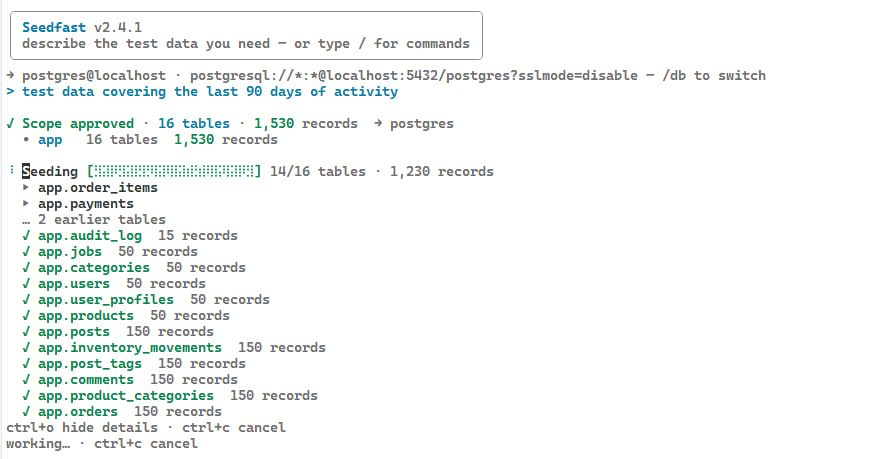
Because Seedfast reads the database rather than your ORM schema, it works with Prisma, Drizzle, TypeORM, Laravel Eloquent, EF Core, and others, whichever one defined your PostgreSQL schema. When a migration changes the schema, the next seedfast seed picks up the new structure, usually with no seed file to update. How much of that schema a single run touches, and how many rows land in each table, is what the scope controls, and the scoping reference covers the flag syntax alongside the interactive equivalent.
# Quick local dev setup
seedfast seed --scope "small team with a few projects"

# Integration test data
seedfast seed --scope "3 users with 2 orders each"

# Staging demo
seedfast seed --scope "realistic e-commerce with 500 products and reviews"
For production reference data like roles and feature flags, a version-controlled SQL file is still the right tool, and the two pair well, since you run your reference seeds first and let Seedfast fill in around them.
Database Seeding in CI/CD
In a pipeline, database seeding needs to be automated, fast, and isolated. No shared databases between parallel test runs, no manual "run this script first" steps, no fixtures drifting from the schema. Python suites get the same guarantee from pytest database fixtures, scope and transactional rollback standing in for a reseed between tests. For a full pipeline setup guide, see the CI/CD database seeding docs, and for the service-container and health-check mechanics underneath it, see Seed a Postgres Test Database in GitHub Actions.
The ideal is a single command after migrations:
# GitHub Actions
steps:
  - name: Run migrations
    run: npx prisma migrate deploy
  - name: Seed test database
    env:
      SEEDFAST_API_KEY: ${{ secrets.SEEDFAST_API_KEY }}
    run: seedfast seed --scope "minimal checkout flow"
  - name: Run tests
    run: npm test
ORM seeders work here too, whether npx prisma db seed, php artisan db:seed, or EF Core seeding via dotnet ef database update, as long as the seeder script is maintained and the CI environment matches dev. Seedfast has no script to maintain in the first place, since it reads whatever schema the migration step just left behind, so the same pipeline line survives a migration that added one column and one that added ten tables.
Many teams share one PostgreSQL database where each service owns its tables. There, Seedfast fills every service's tables in a single command, with none of the "seed users first, then orders, then payments" choreography. If your services use separate databases, that's a harder problem with its own strategies.
Database Seeding Best Practices
The first rule follows straight from the two-kinds distinction above. Production reference data belongs in migrations or a dedicated reference seed that runs in every environment, while test data belongs in a separate step confined to dev, test, and staging.
Make seeds idempotent. A seed that fails on its second run is a seed that breaks CI after a retry, so reach for INSERT ... ON CONFLICT DO NOTHING, upsert patterns, or a clear-and-reseed strategy.
Volume should match the use case, too. Tiny datasets hide bugs like broken pagination, missing indexes, and queries that only crawl at scale, so while local dev can stay small, integration tests should carry enough data to hit edge cases and load tests need production-scale volumes. The SQL patterns for producing that volume by hand, generate_series() and bulk \copy among them, live in the PostgreSQL test data cookbook.
Copying production is the shortcut to avoid. A pg_dump gives realistic data but drops PII into every environment that receives it, and quality masking is harder than it sounds, since you must catalog every PII-bearing column (JSON fields, free-text notes, audit logs) and keep that catalog current as the schema evolves. Miss one and PII leaks through. Generating synthetic data from the schema cuts this risk substantially, since production rows never leave production. (The generator still reads schema metadata like table and column names, so regulated teams should review what those names reveal.)
Automate, don't document. If your onboarding doc lists four commands to run in a specific order for a working database, that's a seed script waiting to be written, and the target is one command with no decisions left to whoever runs it.
Frequently asked questions
What is database seeding?
Database seeding populates a database with an initial dataset, either reference data for production or test data for non-production. Which method fits depends mostly on how often your schema changes. A version-controlled SQL file holds up on a schema that barely moves, while Seedfast re-reads the live Postgres schema on every run and suits one that changes weekly.
What is db seeding?
Db seeding is just shorthand for the same act. The abbreviation comes from tooling, since seed commands ship as db:seed in Laravel and Rails and prisma db seed in Prisma; the terms are otherwise identical.
What does it mean to seed a database?
You run a script against a freshly migrated schema and let its INSERTs execute, be it a seed.sql, an ORM seeder, or a generator reading the live schema. The point is turning an empty-but-valid database into one the app can run against.
What is seeding in database?
Seeding is the lifecycle step between migration and application start. Migrations build the structure and seeding supplies the contents, which is the difference between a database that's correct on paper and one a developer can click through or demo.
What is a seed script?
A seed script is the artifact that does the seeding, version-controlled and re-run when you need data, be it a .sql file, an ORM seeder class, or a one-command generator. A durable one is idempotent, so a second run changes nothing instead of erroring on duplicate keys.
What does seed data mean?
Seed data splits by where each kind may travel. Reference data (roles, country codes) ships everywhere including production, while development and test data (fake users, fixtures) must never reach it, which is exactly why the two belong in separate steps.
What is the difference between migration and seeding?
Both run before the app, hence the confusion, but they do opposite jobs. A migration changes structure and is versioned to run once; a seed adds rows and stays idempotent. Keep them apart, since a migration carrying test rows eventually breaks a deploy.
Why do we seed a database?
Because a valid but empty database is useless, all blank dashboards and tests that fail before they start. Seeding makes the schema usable, and a shared seed gives every developer and CI run the same starting point instead of whatever the last job left.
Should you seed a production database?
Only with reference data, the roles and default settings the app's contract depends on. Development and test data must never land there, so keep two separate steps, a small reference seed that runs everywhere including production and a larger dev/test seed confined to non-production.
What is idempotent seeding?
Idempotent seeding produces the same end state however many times it runs. The second run becomes a no-op instead of a duplicate-key crash, via INSERT ... ON CONFLICT DO NOTHING in PostgreSQL, find_or_create_by! in Rails, or upsert in Prisma, the minimum bar for CI where retries are routine.
What is a seed.sql file?
A seed.sql is the lowest-common-denominator seed, a plain SQL file of INSERTs you run with psql -f seed.sql after migrations build the tables. It has no dependencies and stays deterministic, but it's a snapshot of one schema version, so the next breaking migration invalidates it until someone edits it by hand.
How do I seed a database in CI/CD?
Add a seed step right after migrations, one command with no manual steps and no shared state across parallel runs. ORM seeders work if someone maintains the script; Seedfast skips that upkeep entirely, because seedfast seed reads the current schema on every run and generates against whatever the migration step just created. Host mechanics vary, so on Neon seed the parent once and every branch inherits the data, while on Supabase, preview branches re-apply seed.sql on creation.
Does Seedfast work with my ORM?
The ORM barely matters, because Seedfast talks to the database rather than to your ORM. Prisma, Drizzle, TypeORM, Sequelize, Laravel Eloquent, EF Core, Django ORM, Rails ActiveRecord, SQLAlchemy, or raw SQL all work the same way, provided you're running PostgreSQL. Run your migrations first, then seedfast seed.
When should I use a seed file vs a generator?
Use a version-controlled seed file for small, stable, deterministic data like production reference rows. Reach for Seedfast when the data has to span many tables and stay valid after the next migration, since it reads the schema fresh on every run rather than replaying rows somebody typed against last quarter's structure. For a category-level breakdown of DIY scripts, web generators, enterprise anonymization, and schema-aware generators, see the data seeding tools comparison; for a methods-level comparison, see Test Data Generation: 7 Methods Compared. On Postgres, the best Postgres test data generator comparison ranks options on schema-awareness, FK validity, and CI fit, and you can see how the tools stack up side by side on the comparison hub.
How does database seeding fit into test data management?
Database seeding is one mechanism inside test data management, the act of getting initial data into a database. Test data management is the wider discipline around it, deciding where data comes from, how it stays valid as the schema moves, and who can see it. The test data management guide covers the four-tier breakdown and the in-house framework that wraps this seeding work.
Seed your database in one command
The methods on this page fail in a predictable order. Seed files break first, ORM seeders break the same way a little later, and factory code holds out longest while costing the most to keep alive. What they all share is a human encoding the schema by hand. Seedfast reads that schema itself on every run, on PostgreSQL and under whichever ORM sits on top of it, so the migration that would have broken a seed file just produces the next dataset. The free plan runs on your own schema without a card, if you'd rather watch that happen than read about it.