

Google Antigravity's Manager Surface lets you spawn several agents at once and watch them work in parallel, one untangling a checkout bug, another chasing a flaky test, two more off on unrelated tickets. The friction shows the instant any of them reaches for data, because every agent you launched points at the same dev database and that database is empty, so the parallel runs stall together on rows nobody generated. Antigravity MCP Postgres seeding clears that before the first agent moves. Seedfast registers once in the config the IDE and the CLI both read, and from there one prompt fills the schema with connected rows while the agents are still spinning up.
Antigravity ships real database tooling, yet every one of those tools reads what a schema already holds; none fills a schema holding nothing. Seedfast does that second job, working from the schema itself to put connected rows into every table under it, and the wiring is what this page covers.
What Google Antigravity is now, and what became of Gemini CLI
Google Antigravity launched as an agentic IDE in public preview in November 2025, then widened at Google I/O on May 19, 2026, when Antigravity 2.0 arrived as an agent-first platform with a standalone Antigravity CLI beside the desktop app (Google's announcement, TechCrunch's coverage). If you were leaning on Gemini CLI, that is where it went, retired on June 18, 2026 for Pro, Ultra, and free users, with only Enterprise keeping access. The move ran closer to a rename than a rewrite, the old GEMINI_API_KEY becoming AV_API_KEY while the workflow carried over intact (the transition post).
What keeps the setup below short is that both surfaces read the same Model Context Protocol configuration. They load ~/.gemini/config/mcp_config.json, one user-level file whose mcpServers block covers every surface at once, with no project-scoped MCP file to juggle the way Claude Code keeps a .mcp.json per repo or Codex a config.toml. Register a server once and it answers from both surfaces, so command-line seeding, once Gemini CLI's job, now runs through the Antigravity CLI. One caveat on that path, which has already moved once. Pre-2.0 guides point at ~/.gemini/antigravity/mcp_config.json rather than the config/ location the 2.0 docs use, which is why an older walkthrough may send you somewhere that looks wrong.
Set up Antigravity MCP Postgres in mcp_config.json
Two things have to exist first, a Seedfast account and an API key from the dashboard, which arrives in the sfk_live_... shape. Because mcp_config.json is a user-level file, not something checked into a repo, the key stays in your home directory rather than traveling with a project, which sidesteps the commit-it-safely question the repo-scoped clients have to answer.
Open ~/.gemini/config/mcp_config.json and add Seedfast under mcpServers:
{
  "mcpServers": {
    "seedfast": {
      "command": "npx",
      "args": ["-y", "seedfast@2.6.0", "mcp"],
      "env": {
        "SEEDFAST_API_KEY": "sfk_live_your_api_key_here"
      }
    }
  }
}
The entry is the standard command/args/env shape, and Antigravity runs local stdio servers over npx, so Node 18 or newer is the only prerequisite. Note the pinned version rather than @latest: the tag re-resolves every time the server starts, and we publish often enough that leaving it open means the build under you can change without the config changing. npm view seedfast version tells you what to move the pin to. Restart Antigravity or reload the window, and the server comes up for the IDE and the CLI together. To check the wiring, ask the agent to call seedfast_doctor, which reports whether the CLI is healthy and your key authenticated. Antigravity also carries an in-app screen for adding and toggling MCP servers, and since that menu route has shifted between doc versions, treat the JSON file above as the anchor and let Google Antigravity's own MCP docs hold the current click-path.
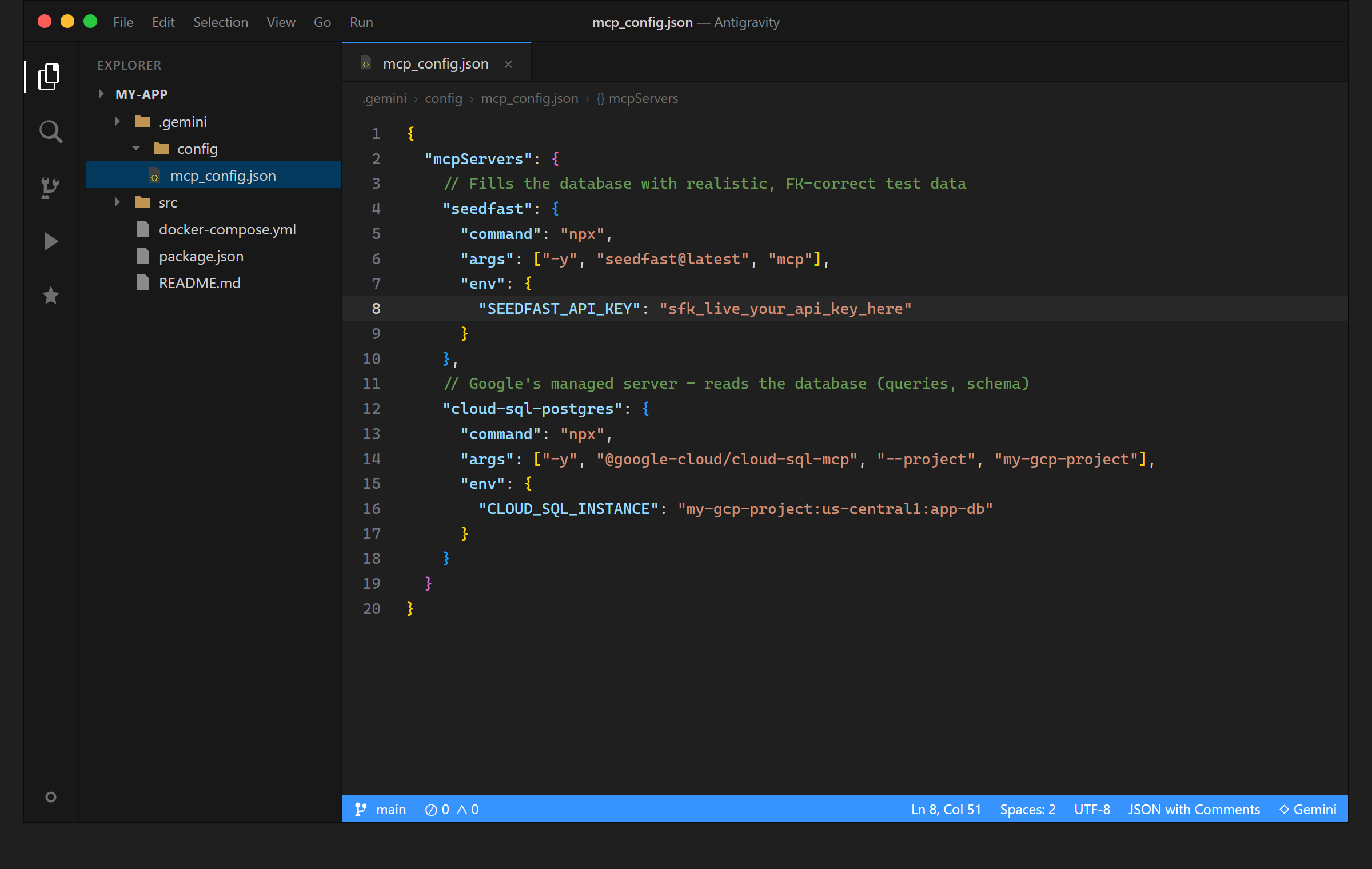
Two more tools ride alongside seedfast_doctor, seedfast_plan and seedfast_run, and the MCP setup guide covers what each returns and how long a run takes.
One prompt, and the schema fills
With the server registered, seeding reads like a request rather than a task. Say a screen you are building needs organizations that own a few users and projects. You would type something close to this into the agent panel:
Seed a handful of organizations, each with a few users and a couple of projects, using seedfast_run
Antigravity hands that scope to seedfast_run, and Seedfast takes the relational side from there, reading the schema as it stands at that moment and writing rows where every user and project belongs to an organization that exists, every value made up new. Scope sets scale as much as shape, so "a handful" keeps a unit test quick while "a few thousand users" gives a query planner something heavier to chew on.
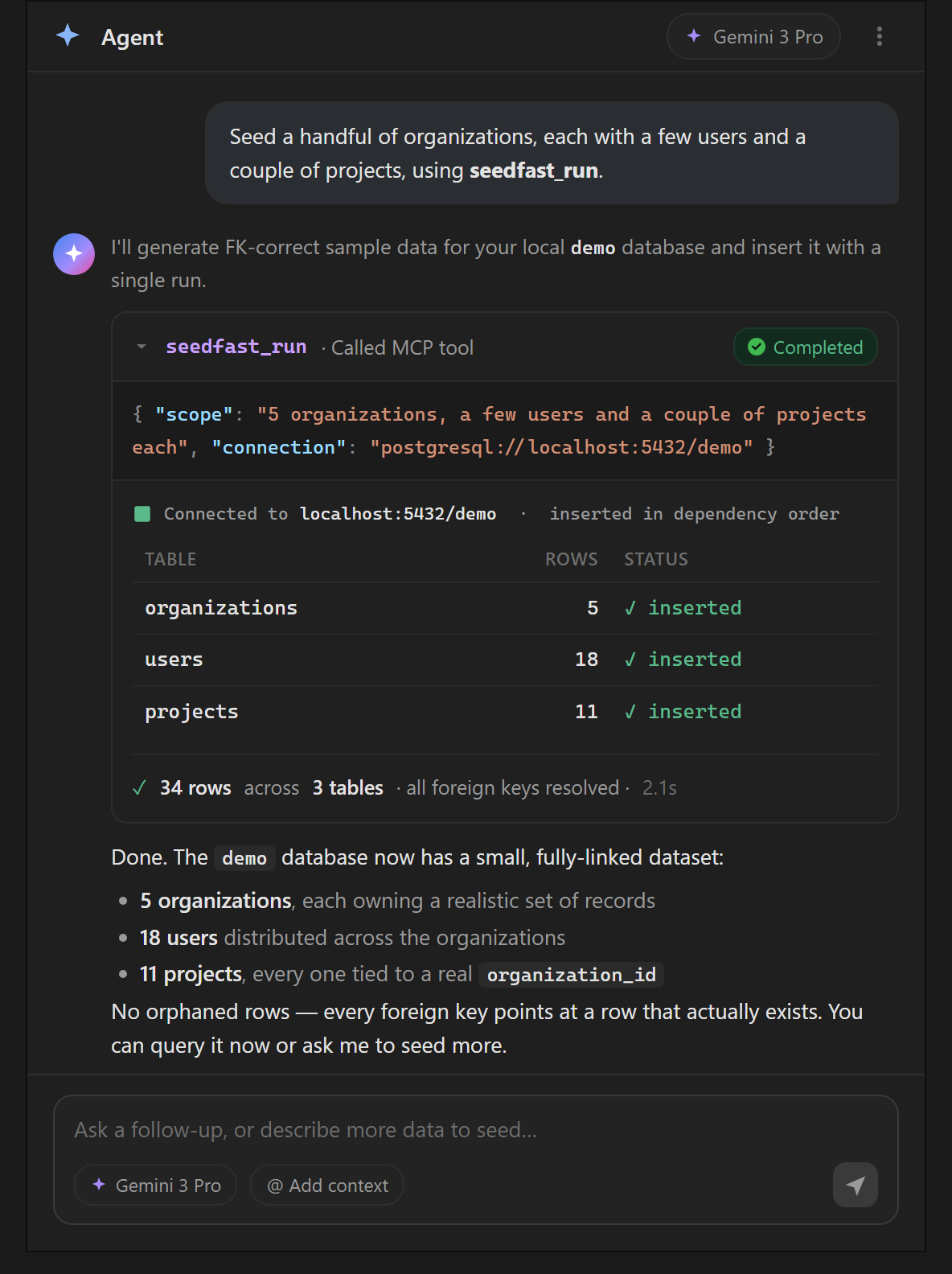
When it finishes, ask for the summary and the agent reports which tables were touched and how many rows landed in each, naming anything that failed; a plain SELECT count(*) reads the same numbers from the database side. The same prompt works from the Antigravity CLI unchanged, since terminal and IDE resolve the same mcp_config.json, so a seed first written at your desk repeats inside an SSH session or a throwaway container off that one line.
Where Antigravity's native database tools stop
Google Antigravity ships database tooling of its own, worth being precise about so you know where Seedfast fits. The built-in MCP Store offers one-click installs for Google-native servers, and the AlloyDB and Cloud SQL connector is the relevant one. Once installed, it exposes list_tables, get_table_schema, execute_sql, and get_query_plan (per the Google Cloud blog), a capable kit for administering and interrogating a database from inside the agent.
Read that list closely and the boundary draws itself. Every one of those tools acts on data already present, listing what exists, describing a table's shape, running a query, explaining a plan. Not one puts a row into an empty table. That is the seam this page has circled, the native tools answering what is in this schema while Seedfast answers the other half, the schema is empty, fill it with connected rows. Both sit in the same mcp_config.json, the Store server for reading and querying, Seedfast for the population step the Google-native tools skip.
Tool Approval, and why the target database still matters
By default Antigravity executes MCP tool calls without pausing for approval, so a seedfast_run fires the moment the agent decides to call it. Turning on Tool Approval, under Settings → Antigravity → MCP → Tool Approval, makes those calls wait for your yes, while terminal commands answer to a separate allow-list, so the two are governed independently. The exact menu labels have shifted between releases, so treat them as directional and confirm in-app.
Gate the calls or not, the durable habit is the connection string, which should belong to a dev or branch database and never to production. Seedfast makes that easy to keep, since it never needs production data to work, reading only the schema and writing fresh rows, so nothing real comes within reach of the run. There is a reason beyond safety, too. Google Antigravity drew rate-limit and throttling complaints through spring 2026, so a dev database is where a stalled or retried run costs nothing.
When the built-in tools are enough, and when they aren't
None of this argues for reaching past the native tools every time. When a database already carries data and you want to inspect it, run a query, or read a plan, the Store's AlloyDB and Cloud SQL server covers the job on its own, and installing a generator you won't call is clutter. The honest scope for Seedfast is the empty schema, the migration that ran against nothing, the branch cloned thin, the fresh container, the moment the tables exist and hold none of the rows a test needs. That part is what the native tools structurally cannot do.
If your seat is elsewhere, the same server block moves with almost no change. Claude Code takes it in a project-scoped .mcp.json and Codex CLI in a config.toml, same block, different client. The case for generating this data rather than handing an agent a copy of production is its own argument, as is the reason raw model-written SQL falls apart on the relationships between tables, both worth reading before you wire an agent to a database it can write to, alongside a wider look at which MCP servers actually generate test data versus the ones that just move files around.
Frequently asked questions
Does Google Antigravity support MCP servers like Seedfast?
Google Antigravity supports MCP servers natively in both the IDE and the CLI, which read them from one shared ~/.gemini/config/mcp_config.json. Google's own servers install from the built-in catalog in a click, while a third-party server like Seedfast goes in by hand as a command/args/env entry under mcpServers, after which the agent can call its tools from either surface.
What happened to Gemini CLI, and does the migration change MCP config?
Gemini CLI was retired on June 18, 2026 for Pro, Ultra, and free users and folded into the Antigravity CLI, with only the Enterprise tier keeping the old tool. The migration ran close to a rename, its main environment change being GEMINI_API_KEY giving way to AV_API_KEY. It leaves MCP registration alone, because the Antigravity CLI reads the same mcp_config.json the IDE does, so a Seedfast entry set up for one already works for the other.
Does Antigravity's AlloyDB MCP server seed a database, or only query it?
Antigravity's AlloyDB and Cloud SQL MCP server queries and administers a database rather than seeding one. Its tools, list_tables, get_table_schema, execute_sql, and get_query_plan, all operate on data that already exists, so an empty schema stays empty however many of them the agent calls. Seedfast covers the other half, reading the same schema and writing the connected rows those tools have no way to create, which is why it sits beside the Google-native server rather than in place of it.
Do Antigravity MCP tool calls require approval before they run?
Antigravity MCP tool calls run without approval by default, executing the moment the agent invokes them. Switching on Tool Approval in the MCP settings holds each call until you confirm it, while terminal commands answer to their own allow-list. For a seed in particular, the setting that earns more than the approval gate is the connection string, kept pointed at a disposable database so an unattended call has nothing valuable to reach.
Data in place before the agents spread out
The parallel-agents picture from the top is really an argument for doing the data step first, and once. When the agents meet a schema that already holds organizations, users, and projects that hang together, none of them burns a run improvising fixtures or going green against nothing, and what you read back at review reflects code rather than a gap in the setup. Seedfast is the piece that puts that data there, and the free plan is room enough to drop in the one config block and watch a schema fill with connected rows before the agents you spawned ever notice it was empty.
