

Tonic Fabricate is a hosted synthetic data product from Tonic.ai. You describe the data you need to a chat agent Tonic calls the Data Agent, it builds that dataset inside a database Fabricate runs for you, and usage past your monthly credits is metered in tokens. Anyone shopping for a Tonic Fabricate alternative usually wants something narrower than that whole workspace, namely their own PostgreSQL database holding coherent rows, put there by a command that also runs in CI.
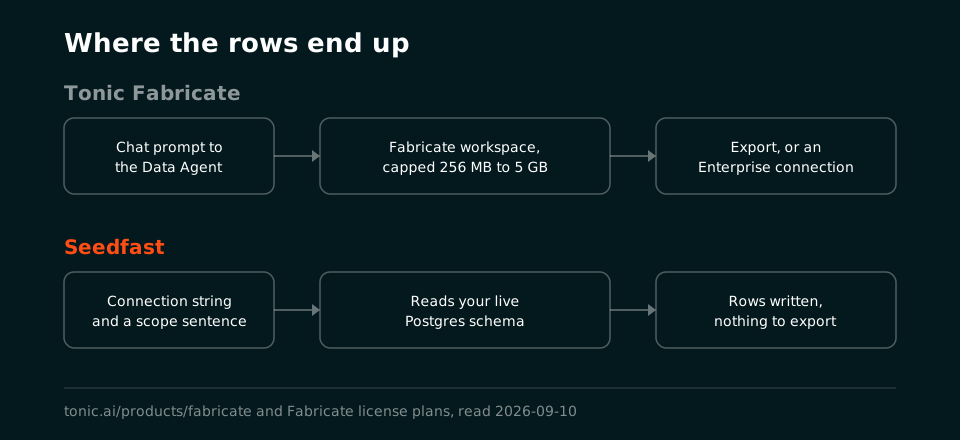
Where we land, September 2026, stated as our opinion rather than as a benchmark. Fabricate is the broader product by a wide margin, listing eight database engines and a dozen export targets on its product page, and its chat agent will happily reason about a schema you have not built yet. What tends to surprise people partway through an evaluation is where the rows go, because Tonic's own documentation puts database connections behind an Enterprise license, so on the plans you can buy with a card the data lands in Fabricate's workspace and comes out of it as an export. Seedfast has no workspace to export from. It runs on your machine and fills the PostgreSQL database whose connection string you handed it.
What Tonic Fabricate is, in Tonic's own words
Their documentation opens by stating that "Tonic Fabricate allows you to create data from scratch," and everything after that follows the shape of the sentence. Inside a project you brief the Data Agent through a chat interface, adding clarifying details and attaching files as you go, and the example they publish reads "Create 70 customers. Each customer has 1-3 orders. Each order has 1-5 products. You can choose the distribution of the customers throughout the United States." How much the agent checks with you first depends on the mode, with Agent as the default, Plan drafting each action for review, and Autonomous doing the work "without asking you for any confirmation at all."
Two details shape an evaluation more than the chat surface does. One is the plan table, where local databases are capped at 256 MB on Free, 1 GB on Plus and 5 GB on Enterprise, a single workspace comes with Free and Plus, and the row that decides the most says database connections are Enterprise only, a line their connection page repeats without hedging, "Database connections require an Enterprise license." Fabricate also happens to be mid-transition. Their docs home carries a deprecation notice for the older declarative product ("Fabricate has deprecated rule-based databases, which were only available with Enterprise plans"), and the API page notes that "Except for generating data, most API calls are designed for rule-based databases," which reads to us like a programmatic surface being rebuilt around the agent rather than around configuration.
Give Fabricate its due on breadth. Their product page advertises generation for PostgreSQL, MySQL, Oracle, Databricks, Snowflake, MongoDB, SQL Server and SQLite, exports covering CSV, JSON, Parquet, Avro, Iceberg, DOCX, EML, SQLite, MongoDB, Snowflake and Amazon S3, mock APIs standing over the generated data, and a validation agent on Plus and above that re-checks what the Data Agent produced. Nothing in Seedfast's roadmap competes with that spread, and a team whose tables sit in Snowflake or SQL Server has already finished this comparison.
Tonic Fabricate alternative comparison, row by row
Every Fabricate figure below was re-read on Tonic's own pages on 10 September 2026, and Sources lists the URLs. Our own numbers come from seedfa.st/pricing and from guides that print the run transcript behind them. Where Fabricate is the better answer, the row says so.
| What you are doing | Tonic Fabricate | Seedfast |
|---|---|---|
| Product shape | Hosted chat agent in a browser, with an API and an MCP server alongside it | Command-line tool on your own machine, with an MCP server and a CI step |
| Saying what you want | A prompt to the Data Agent ("Create 70 customers. Each customer has 1-3 orders.") | A --scope sentence on the command line, writable in any human language |
| Where the generated rows land | A Fabricate-hosted database in your project, which you then export | The PostgreSQL database named in your connection string |
| Connecting to a database you own | Enterprise license only, and it must allow Fabricate's IP addresses | Any Postgres your machine can reach, on every plan including the free one |
| Hosted database size cap | 256 MB on Free, 1 GB on Plus, 5 GB on Enterprise | No such cap, because there is no intermediate database |
| Database engines (Fabricate covers more) | PostgreSQL, MySQL, Oracle, Databricks, Snowflake, MongoDB, SQL Server, SQLite | PostgreSQL today, including Supabase, Neon and Amazon RDS; other SQL engines in development |
| Export formats (Fabricate covers more) | CSV, JSON, Parquet, Avro, Iceberg, DOCX, EML, SQLite, MongoDB, Snowflake, Amazon S3 | None, since the seeded database is the output |
| Mock APIs over the generated data (Fabricate only) | Yes, advertised on the product page | Not a feature we offer |
| One command in CI after a migration | No command-line tool found in their published docs; API keys are offered for CI | Yes, one step with documented exit codes |
| MCP for AI coding agents | Fabricate MCP; the client talks to the hosted Data Agent, OAuth for Claude and Cursor | seedfast_run performs the seed against your database (setup) |
| Exact row count per table | Written into the prompt sentence; no numeric guarantee stated in their docs | Written into the scope; three published runs with the verification SQL |
| Language of generated values | No locale setting found in Fabricate's docs; handled as prompt wording | Named per table inside the same sentence (six measured runs) |
| References across related tables | Relational generation across the tables in one conversation | Each reference lands on a row that exists, circular references included |
| Quality re-check after generation | Validation agent on Plus and Enterprise, not on the free plan | The run reports rows written per table and returns a non-zero exit code when it fails |
| Free plan | $0 with $5 of monthly credits; a personal-email signup has no access to the top-tier models | $0 with $5 of monthly credits, $10 on a work-email signup, no card |
| Paid entry price | Plus at $29 a month including $25 of credits, then pay-as-you-go | Basic at $16 a month with $32 of credits, Premium at $69 with $180 |
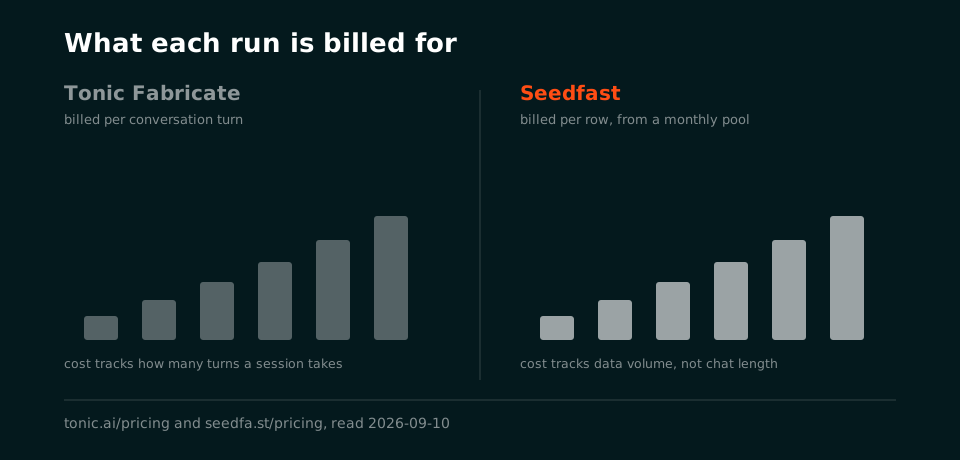
| How usage is counted | Tokens, at roughly $0.17 a standard turn and $0.37 a complex turn | Credits drawn by how much data a run generates, with no per-row and no per-token price |
| Getting to the first row | Create an account, create a project and a database, start a chat | npm install -g seedfast, log in, run one command |
Three rows in that table go to Fabricate outright, and none of them is a technicality. If your data does not live in Postgres, engine coverage ends the discussion before the other rows get a vote. Teams whose actual deliverable is a file handed to somebody else, rather than a database that has to be usable by morning, will care about the export list for much the same reason. As for mock APIs standing over generated data, we do not do that at all.
Where the two tools part company
The database the rows end up in
Nothing on either pricing page makes this difference obvious. Fabricate's generated data lives in a database inside your project, capped by plan, and getting it into your development environment means exporting it or moving to an Enterprise license that permits a connection. Their product page does advertise connecting "directly to your production databases" to model from real schemas and distributions, and the license table is where you find out which plan that sentence belongs to.
On our side there is no intermediate copy at any point. You hand the CLI a connection string, it reads the schema sitting behind it, and the rows appear in those tables. Since a security review will ask about the data path anyway, here it is stated plainly rather than buried. The schema definition, meaning table and column names, types and constraints, goes to an AI provider so it can generate values that fit those columns. Row data never leaves your database. If a column name is itself sensitive, that is the detail to settle before adopting either tool.
One sentence, run again after the migration
seedfast seed --scope "Seed the crm and billing schemas: 200 customers, 600 contacts, 400 addresses, 3 plans, 300 subscriptions, 1,200 invoices with 60% paid, 25% overdue and 15% disputed, 400 support tickets and 1,600 ticket messages."
That command is the whole configuration. Because the schema is re-read on every run, a migration that landed this morning is already reflected in this afternoon's seed, and the sentence you wrote last month goes on working without an edit. In a pipeline it becomes one step behind SEEDFAST_API_KEY, placed after the migrations. The exact row counts guide prints three runs of that exact scope against a fresh schema, each followed by the SQL that counted the result. Run one planned 4,703 records across eight tables, reported 8/8 tables succeeded in 79.59 seconds, and every table that carried a number in the sentence came out carrying that number.
We could not find an equivalent published run on Fabricate's side. Their docs describe generated output in prose rather than showing rows, and no page we loaded states an exactness guarantee for counts or shares either way, so treat this as a gap in what is documented rather than a claim about how their agent behaves. What we can do is show ours and let you check it against your own schema.
Two MCP servers, pointed at different databases
Both products ship one, and repeating "we have MCP, they don't" would be false. What differs is where the tool call ends up. Fabricate's MCP server "allows AI clients to communicate directly with the Fabricate Data Agent" so an assistant can create databases, run workflows and download results, with OAuth recommended for Claude and Cursor and API keys for CI. Generation still happens in Fabricate, and the output still starts life in Fabricate's own database.
Seedfast's server exposes the same run the CLI performs. An agent calls seedfast_schema_info to read what is actually in the database, seedfast_run to start the seed, then seedfast_run_status until it finishes, and the rows land in your Postgres while the conversation is still open. The AI agent seeding guide walks a real transcript of that loop with Claude Code.
What a month costs when the pipeline seeds every build
Tonic prices AI work rather than data. Their pricing page defines usage in tokens, "chunks of data like words, numbers, or values in a table," puts a standard turn at approximately $0.17 and a complex one at approximately $0.37, and notes that the free plan's $5 "covers roughly 9 highly complex, multi-step generation sessions." Plus buys $25 of credits for $29 a month and then bills pay-as-you-go. For exploratory work in a browser that model is reasonable and you can stop when the credits run out. Wire the same generator into a build that runs forty times on a busy day and the forecast stops being a number and becomes a range.
Enterprise adds a lever we have no answer to, which is bringing your own Anthropic or Amazon Bedrock key. Tonic then stops charging for AI usage and you pay the model provider directly, a genuine advantage for a team already buying inference at volume, and one that also makes the model you choose part of what a run costs.
Seedfast sells a monthly plan holding a pool of credits, spent by how much data a run generates. A full session on a schema of about thirty tables comes to roughly $0.60, which is where the eight, fifty and three hundred runs a month on the pricing page come from. The subscription price stays fixed regardless of build frequency, and the free plan refills $5 every month without asking for a card.
Which Tonic Fabricate alternative fits
Neither vendor's marketing will answer the question sitting underneath all of this. Is what you need at the end a dataset, or a database that works?
Fabricate produces the first one well, across engines we will not reach for a good while and in formats a data team can pass around. Anybody can drive it from a browser tab, which matters more than engineers usually credit. Where a budget stretches to Enterprise, the direct connection and the bring-your-own-key economics put the second artefact within reach too, and at that point you are choosing between two real products rather than between a product and a workaround.
We only ever built the second one. The CLI takes your connection string and a sentence saying what the data should represent, then the tables in your own Postgres come out holding rows that satisfy the keys and checks already declared there. Whether that survives contact with your schema takes about two minutes to find out on the free plan, and how a first seed goes walks the same run in writing if you would rather read it first.
Cross-shopping is worth half an hour here. Tonic.ai alternatives splits that vendor's three separate jobs into three shortlists, Tonic Fabricate vs Mockaroo sets both of them against a Postgres CLI, Syntho is the answer when the platform has to run inside your own network, and test data tool pricing lines the money up on its own. Widen the field past head-to-heads and the best Postgres test data generator guide ranks the category, while data seeding tools takes the regulated-industry angle. The comparison hub carries the full matrix.
Frequently asked questions
What is Tonic Fabricate used for?
Teams use it to generate relational and unstructured data from scratch, with no production copy involved. Their documentation states the purpose plainly, "Tonic Fabricate allows you to create data from scratch," and the working surface is a chat agent you brief inside a project, with an API and an MCP server alongside it for programmatic access. Fabricate sits beside Tonic Structural, a separate product that de-identifies real production data, so a shortlist mixing the two is comparing different jobs.
Is there a Tonic Fabricate alternative that runs from the command line?
Seedfast is one. The command takes a connection string and a --scope sentence, reads the schema on that run, and writes the rows into the database you pointed it at, with documented exit codes so a build can gate on the result. On Fabricate's side we found an API with a Python library and an npm client in their published docs on 10 September 2026, and no page documenting a command-line tool.
How much does Tonic Fabricate cost?
Free is $0 a month with $5 of monthly credits, Plus is $29 a month including $25 of credits and then pay-as-you-go, and Enterprise is custom with pooled usage. Beyond the included credits, usage is counted in tokens at approximately $0.17 for a standard turn and $0.37 for a complex one (tonic.ai/pricing, read 10 September 2026, and vendor pricing pages move, so re-check before budgeting). The comparable Seedfast numbers are $5 of credits on the free plan, $32 on the $16 Basic plan and $180 on the $69 Premium plan, with no meter running underneath any of them.
What does the Tonic Fabricate free tier include?
Signing up for free gets you $5 of monthly credits, one workspace, a local database capped at 256 MB, basic export options and support through Discord. Two things sit outside that. The validation agent starts at Plus, and connecting to a database of your own requires an Enterprise license, which means the free tier lets you evaluate the agent rather than your schema. Their license page adds that a signup on a personal email address has no access to the top-tier models, while a work email gets a larger AI allowance. Our free plan carries $5 of credits monthly, $10 on a work-email signup, and it works against your own database from the very first command.
Can Tonic Fabricate seed my own PostgreSQL database?
On an Enterprise license, yes. Fabricate connects to Amazon Redshift, Google BigQuery, Microsoft Fabric, MySQL, Oracle, PostgreSQL, Snowflake and SQL Server, the connection requires that Enterprise license, and your database has to allow traffic from Fabricate's IP addresses. Seedfast reaches Postgres on every plan including the free one, since the CLI runs on your own machine with credentials you already hold and nothing needs opening up for it. Below Enterprise, the route from Fabricate to your database runs through an export instead.
What can Tonic Fabricate do that Seedfast cannot?
Quite a lot, and it is worth being specific about it. Fabricate covers eight database engines against our one and exports into a dozen file and warehouse formats. It generates unstructured documents and emails beside the relational rows, stands up mock APIs over what it made, and lets an Enterprise customer supply their own model key so Tonic stops billing for AI usage. It also runs entirely in a browser, which counts for something when the people who need the data are not the people who own a terminal.
Sources
Every Fabricate claim above was read on Tonic's own pages on 10 September 2026:
- tonic.ai/pricing for the Free, Plus and Enterprise tiers, the credit amounts, the token definition and the per-turn figures
- tonic.ai/products/fabricate for the engine list, export targets, mock APIs, the live database connectivity sentence and the MCP description
- docs.tonic.ai/fabricate for "create data from scratch" and the rule-based deprecation notice
- Fabricate license plans for the 256 MB / 1 GB / 5 GB caps, workspace counts, the Enterprise gates and the personal-email model restriction
- About the Fabricate Data Agent for the chat workflow and the Agent, Plan and Autonomous modes
- Prompting the Data Agent to generate data for the "Create 70 customers" prompt example
- Adding a database connection to a project for the connectable engines, the Enterprise license requirement and the IP allowance
- Using the validation agent for what the validation agent checks and its plan availability
- Using the Fabricate API for the Python library, the npm client and the rule-based note
- Using the Fabricate MCP server for what MCP clients can do and the OAuth and API-key guidance
Seedfast figures come from our own pricing page and from three guides that print the CLI transcript and the verification queries behind them: exact row counts, localized test data and AI agent seeding.
Verified: September 2026. Tonic ships often and its documentation paths have moved before, so read every quote here as a snapshot of 10 September 2026 and check Tonic's own page whenever a detail is load-bearing for your decision. Verdicts on this page are our opinion, and the figures are the vendors' own.
Seed the database you already have
Comparison pages are cheap to write and easy to slant, which is why every number above carries the page it came from and the date we read it. Ours are the same figures our own guides publish, transcripts and verification queries included. Seedfast still asks for exactly two things, a connection string and a sentence, and what arrives is a Postgres database whose rows already satisfy the keys and constraints its schema declares. No export waits to be moved afterwards. Point it at a schema you know well on the free plan and judge the rows yourself.
Related guides:
- Tonic.ai Alternatives for masking, ML synthesis and seeding as three separate shortlists
- Tonic Fabricate vs Mockaroo for both of them against a one-command Postgres CLI
- Test Data Tool Pricing for the money on its own
- CI/CD Database Seeding for the pipeline step, with exit codes