

You assign an issue to Copilot, and a few minutes later a pull request is waiting for review with its checks already red. The migrations ran. What broke is everything downstream of them, the tests that expected a customer to exist, an order to join against, a row to assert on, all firing against a schema with nothing inside it. Copilot coding agent database seeding is the fix, and it comes down to one file, .github/workflows/copilot-setup-steps.yml, where Seedfast reads the schema your migrations just created and fills it before the agent writes a line.
GitHub renamed Copilot coding agent to Copilot cloud agent on April 1, 2026, and both names are live across its docs right now, so I'll stay with "coding agent" throughout. Why you'd hand that agent freshly generated data instead of a clone of production is its own subject; here I'm taking that decision as made and wiring the environment.
Where a coding agent task actually runs
Every task Copilot picks up runs in a throwaway GitHub Actions environment provisioned for that one job, on a single branch that becomes a single pull request. Nothing persists between tasks. When the run ends the environment is gone, so the database behind it has to be built from scratch each time rather than assumed from an earlier session. Seedfast rebuilds the data half of that in one step, reading whatever schema the migrations left behind and writing connected rows into it, which is why the same file works on a task you assign next month against a schema three migrations further along. The setup phase you control tops out at 59 minutes, and otherwise the environment behaves like the Actions jobs you already write, down to the service-container mechanics, with one twist in the secrets model.
The copilot-setup-steps.yml file, and the line that breaks it silently
The configuration lives at .github/workflows/copilot-setup-steps.yml, and it reads like an ordinary workflow, except only one job inside it is read, the one named copilot-setup-steps. Name it anything else and GitHub ignores the file with no error and no warning, and the agent starts against an empty database as if you'd never written it. GitHub's environment customization docs list the honored keys, and the set is small. You get steps, permissions, runs-on, services, snapshot, and timeout-minutes, and anything outside that set is quietly dropped. snapshot is listed as honored, but the docs don't describe what it does, so I'll leave it in the set without guessing at its behavior.
The job runs before the agent starts, and it also fires on workflow_dispatch and on any push or pull request touching the file itself, which lets you prove the setup is green without waiting on a real task. One requirement is easy to miss. The file has to live on your default branch to take effect at all; a copy on a feature branch does nothing.
A setup file that migrates and seeds Postgres
Here's a minimal, runnable version that stands up a PostgreSQL service, runs your migrations against it, and seeds it with Seedfast.
name: Copilot setup steps

on:
  workflow_dispatch:
  push:
    paths:
      - .github/workflows/copilot-setup-steps.yml

jobs:
  copilot-setup-steps:
    runs-on: ubuntu-latest
    timeout-minutes: 20
    services:
      postgres:
        image: postgres:16
        env:
          POSTGRES_PASSWORD: postgres
          POSTGRES_DB: app
        ports:
          - 5432:5432
        options: >-
          --health-cmd "pg_isready -U postgres"
          --health-interval 10s
          --health-timeout 5s
          --health-retries 5
    steps:
      - uses: actions/checkout@v4

      - name: Run migrations
        run: npm run migrate
        env:
          DATABASE_URL: postgres://postgres:postgres@localhost:5432/app

      - name: Seed with Seedfast
        run: npx seedfast seed --scope "20 customers with orders and line items" --output json
        env:
          DATABASE_URL: postgres://postgres:postgres@localhost:5432/app
          SEEDFAST_API_KEY: ${{ secrets.SEEDFAST_API_KEY }}
The services block brings up a postgres:16 container with a health check that holds the run until the database answers, the same pattern any Actions job uses, so nothing here is Copilot-specific until the secret. Migrations run first against localhost:5432, then the seed step calls npx seedfast seed (npx ships with npm) with a plain-language scope and --output json for a machine-readable result. Seedfast reads the schema off that connection string and composes fresh rows whose relationships resolve, inventing every value rather than copying anything out of a real database, the generate-per-run approach behind synthetic data in CI/CD. Exit codes and the rest of the pipeline-side mechanics live in the CI/CD seeding docs.
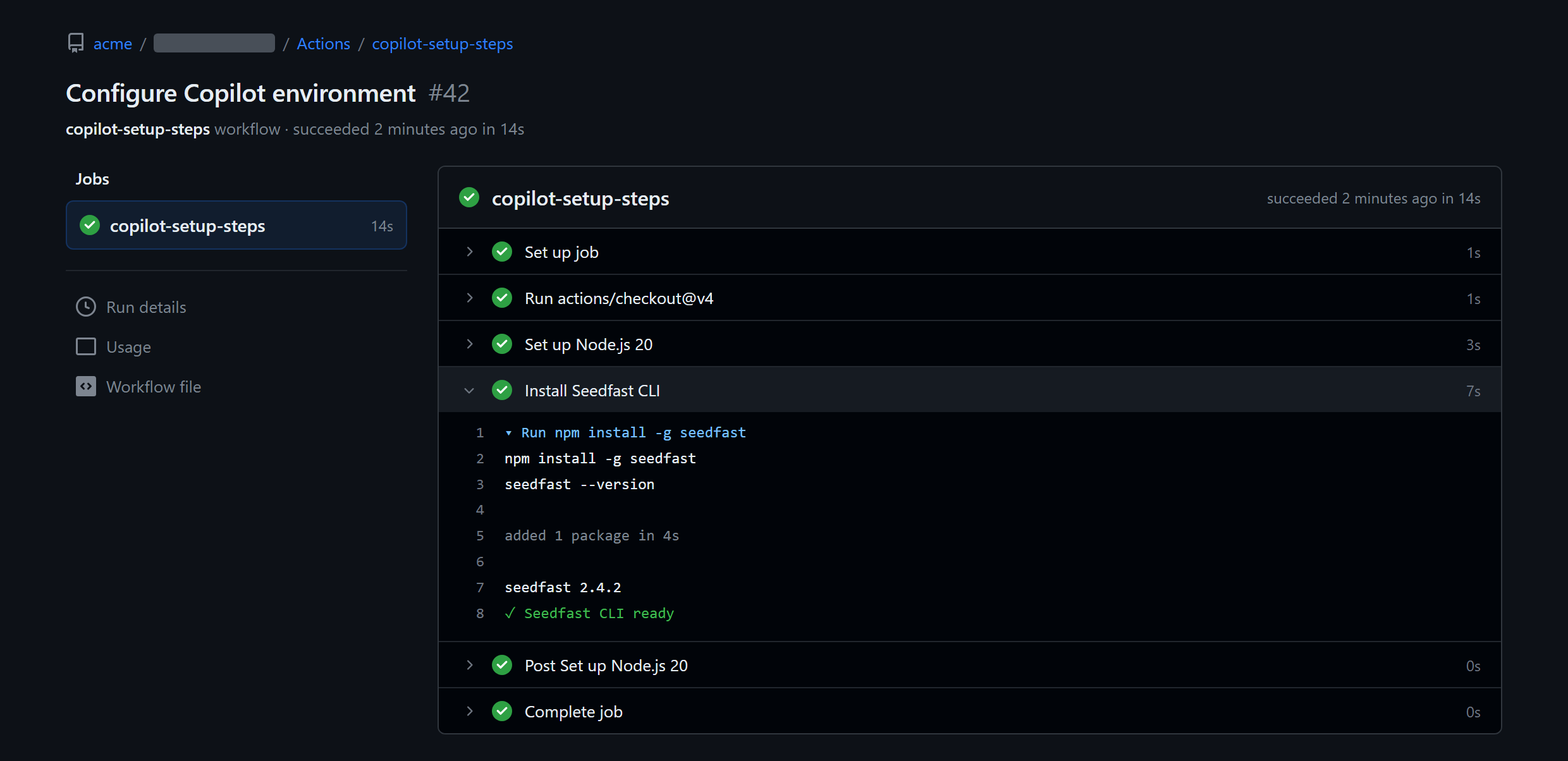
If you already seed this schema locally with a Compose stack, the file above is the CI cousin of that docker-compose seeding workflow, except this container is discarded the moment the task ends. One gap is worth flagging. Whether that postgres:16 service stays reachable at localhost:5432 once the agent later runs your test command itself, rather than during setup, isn't something the docs spell out, so treat the service as guaranteed for the setup steps and verify it for anything the agent runs afterward.
Why the agent can't see your Actions secrets
A working setup file can still fail at the secret. The agent doesn't read your repository's Actions secrets, nor the Codespaces or Dependabot ones; it reads only the secrets you add under a separate store, at Settings → Secrets and variables → Copilot (the tab GitHub's secrets and variables guide refers to as Agents). A team whose SEEDFAST_API_KEY has always lived in Actions secrets watches the seed step throw an auth error that has nothing to do with the key being wrong, because from the agent's environment that value isn't there.
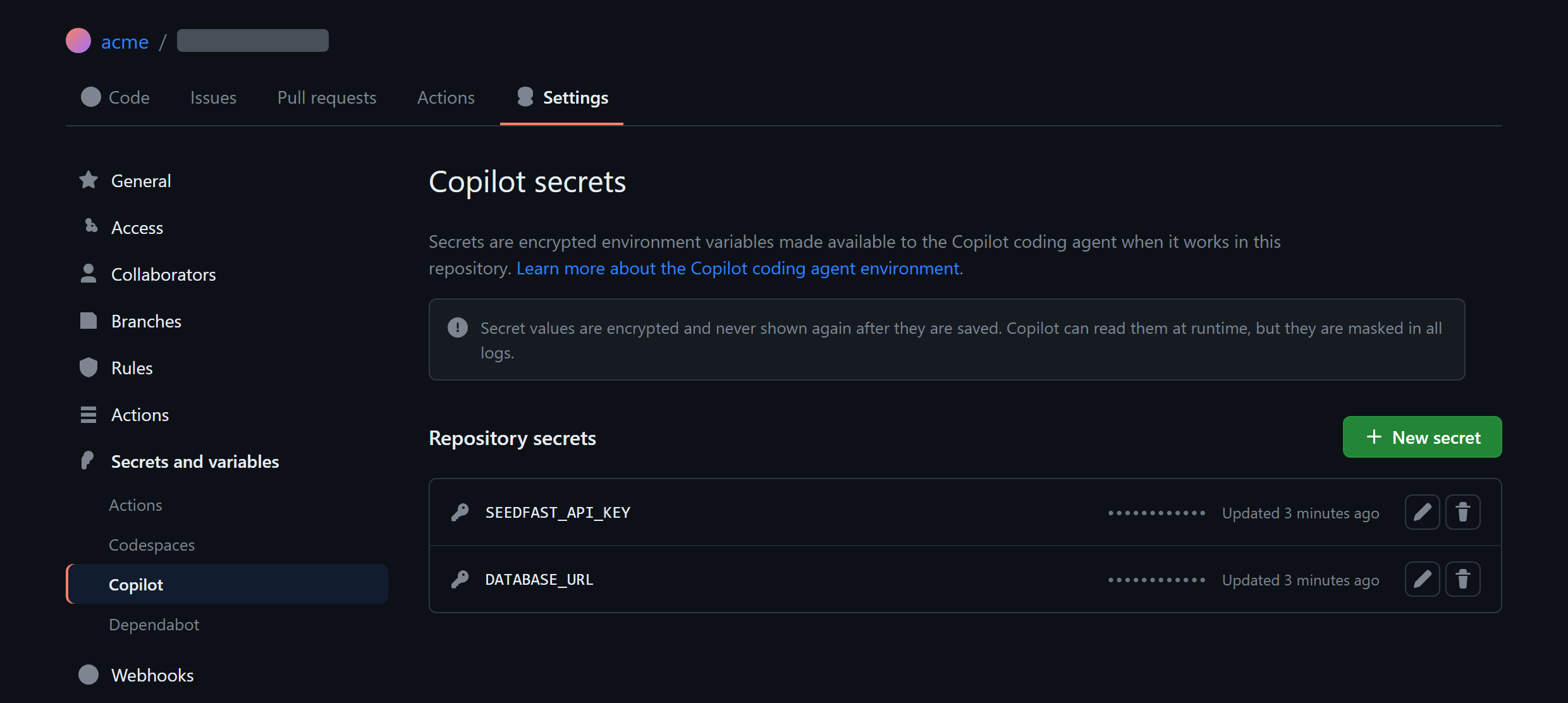
Whatever you put in that tab arrives in copilot-setup-steps.yml as an environment variable, which is what the seed step expects from ${{ secrets.SEEDFAST_API_KEY }}. One naming detail matters on the MCP route covered next. A secret consumed by an MCP server carries the COPILOT_MCP_ prefix, so the same value becomes COPILOT_MCP_SEEDFAST_API_KEY there, while the setup-steps file needs none.
The firewall that doesn't touch your setup steps
Copilot's coding agent runs behind a firewall that's on by default, and a blocked outbound call shows up as a warning on the pull request. What matters for seeding is the firewall's scope. Per GitHub's firewall documentation, it "only applies to processes started by the agent via its Bash tool. It does not apply to Model Context Protocol (MCP) servers or processes started in configured Copilot setup steps." So the seed step above never meets the firewall, and you allowlist nothing for it to reach the Seedfast API.
The firewall only bites when the agent itself runs the seed mid-session, calling npx seedfast seed through its Bash tool. For that case, add seedfa.st to the allowlist under Settings → Copilot → coding agent → Custom allowlist, and the call goes through.
MCP is the other way to give the agent a seed tool it can call by name, sitting on the safe side of the firewall just as setup steps do. You configure it in the repository under Settings → Code & automation → Copilot → MCP servers, pasting a JSON block rather than committing a file. Local npx servers are supported, using "type": "local" with "command": "npx", and any secret the block references takes the COPILOT_MCP_ prefix. GitHub's MCP extension guide carries the full schema. It's the same npx-launched Seedfast server the terminal agents register, parked in settings instead of a config file, and it fits when you want the agent seeding on demand mid-task rather than once up front.
When this isn't worth setting up
Not every task needs any of this. When the work never runs data-dependent code, a docs fix, a refactor nowhere near the test path, a copy change, a seeded Postgres buys you nothing and the file is dead weight on your default branch. Add it when your suite genuinely hits the database on the branches Copilot works, and skip it otherwise.
There's a second cost worth naming. The Agents secrets store, the firewall allowlist, and the MCP JSON all live in repository or organization settings, so standing them up needs repo-admin, more ceremony than the terminal agents ask for. Claude Code reads one .mcp.json at the repo root, Codex CLI takes one codex mcp add into a config.toml, both keeping the arrangement in files a developer owns without opening GitHub settings. A team already seeding through one of those in their editor may not want a second, settings-level setup just for Copilot's cloud runs, and that's a fair call.
Frequently asked questions
What must the copilot-setup-steps.yml job be called?
The job in copilot-setup-steps.yml must be named copilot-setup-steps exactly, or GitHub skips the file. Nothing warns you when the name is wrong; the agent just starts without your setup having run, a common reason a database that should have been populated turns up empty. It also has to be committed to the default branch before it takes effect.
Can the GitHub Copilot coding agent use a Postgres service container?
Yes. The GitHub Copilot coding agent honors a services: block in copilot-setup-steps.yml, so a postgres:16 service container starts exactly as it would in any GitHub Actions job. Attach a health check so the setup waits until the database accepts connections, then run your migrations and a Seedfast seed as ordinary steps against localhost:5432.
Why doesn't my GitHub Actions secret work in copilot-setup-steps.yml?
A GitHub Actions secret doesn't reach the coding agent because the agent reads a different store. Only secrets under the Copilot tab of Settings → Secrets and variables (the store GitHub's docs call Agents) are exposed to copilot-setup-steps.yml; the Actions, Codespaces, and Dependabot stores stay invisible to it. Move the value into that tab and the reference in your YAML resolves.
Does the Copilot coding agent's firewall block calls to the Seedfast API?
Not from your setup steps. The firewall is scoped to processes the agent launches through its Bash tool, so seeding that runs inside copilot-setup-steps.yml or through an MCP server reaches the Seedfast API untouched. Only when the agent runs npx seedfast seed itself, mid-task, does the firewall apply, and adding seedfa.st to the coding-agent allowlist clears that path.
Data behind the code, before review
The payoff shows up at review time. When Copilot's pull request lands, its checks have run against generated rows with valid relationships, so red on the branch points at code the agent got wrong rather than fixtures nobody remembered to load. Seedfast keys come from the dashboard, and the free plan is enough to wire this into a repo and watch a task come back green off a database it built itself. Put the file in place once, and it stays a thing you set up rather than a thing you maintain, every task Copilot takes on after that starting with data already behind it.
