

Every CI job starts with an empty database. The service container comes up with a fresh Postgres inside it, nothing carries over from the last run, and whatever your tests expect has to be put there between checkout and the test runner. That leaves a short, well-worn list of ways to make GitHub Actions seed Postgres database state for your tests, and most test-pipeline pain traces back to which one a team reached for.
This is the platform-mechanics page. It covers the service container GitHub Actions hands you, the health gate that stops a seed step from racing a database that isn't listening yet, the migrate-then-seed order, and the three real ways to fill the thing once it's up. Seedfast is the third of those, reading the schema your migration step just produced and generating rows into it as one pipeline step. The CI/CD database seeding docs own the end-to-end wiring, and the case for generating data rather than copying it lives in synthetic data for CI/CD. Here the subject is the plumbing, database seeding applied to a GitHub Actions runner.
TL;DR: A GitHub Actions service container gives every job a throwaway Postgres. Gate it with --health-cmd pg_isready, run migrations, then seed, in that order. Three approaches fill it. Restoring a dump is stale and heavy, an ORM seed script needs upkeep as the schema grows, and Seedfast reads the structure fresh on each run without promising repeatable values, so pin the few rows a test asserts on in a checked-in reference file.
The Postgres service container GitHub Actions tears down every run
GitHub Actions runs a service container alongside your job and throws it away when the job ends, which means the Postgres you get is genuinely disposable, empty at the start of every run and never carrying a stray row from one build into the next. You declare it under services:, pin an image, and hand it a health check so the runner knows when the database is truly accepting connections, not just booted.
name: Test

on: [push, pull_request]

jobs:
  test:
    runs-on: ubuntu-latest
    services:
      postgres:
        image: postgres:16
        env:
          POSTGRES_USER: app
          POSTGRES_PASSWORD: app
          POSTGRES_DB: app
        ports:
          - 5432:5432
        options: >-
          --health-cmd pg_isready
          --health-interval 10s
          --health-timeout 5s
          --health-retries 5
    steps:
      - uses: actions/checkout@v4
      - uses: actions/setup-node@v4
        with:
          node-version: 22
      - run: npm ci

      - name: Run migrations
        run: npm run migrate
        env:
          DATABASE_URL: postgres://app:app@localhost:5432/app

      # --- one of the three seed steps below goes here ---

      - run: npm test
        env:
          DATABASE_URL: postgres://app:app@localhost:5432/app
Your own values replace app:app and the database name, and where the target is a managed instance with an sslmode and a non-default port, the Postgres connection string builder assembles the URI out of the separate parts.
The options: block does the load-bearing work here. Docker calls a container "running" the instant its process starts, but Postgres spends a beat finishing recovery before it opens its socket, and a migration step that fires into that window dies on "connection refused". --health-cmd pg_isready closes the gap, holding your steps back until pg_isready exits clean, so "healthy" and "ready to connect" become the same event.
The hostname is what trips people. This workflow sets no container: key, so its steps run on the runner VM and reach Postgres over localhost:5432 through the ports: mapping. Set container: on the job instead, running your steps inside node:22-bookworm-slim, and it flips the other way — you drop the ports: mapping and connect to postgres:5432, the service label, because containers on the same Actions network resolve each other by name. Getting that backwards is the most common "connection refused" here, and GitHub's own PostgreSQL service-container docs spell out both cases. The same service block powers other Actions contexts too; the GitHub Copilot coding agent runs it inside copilot-setup-steps.yml.
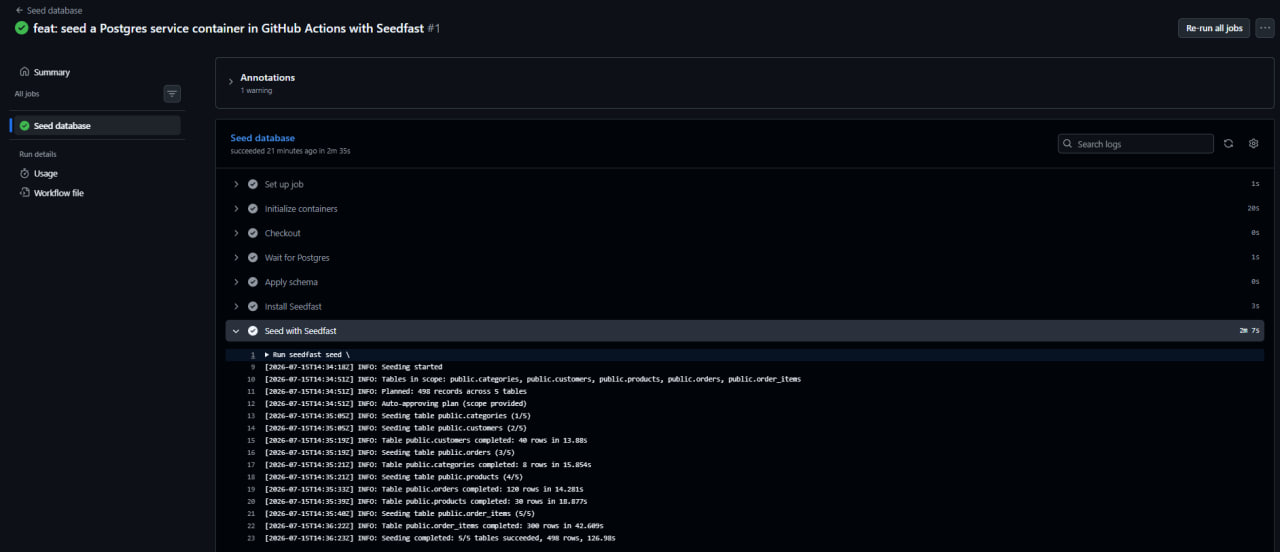
This whole workflow runs green in a public demo repo you can fork — the Postgres service container comes up, the schema applies, and the seed step reports every table it filled:
Migrate first, then seed
Order is not negotiable here. A seed step against a schema that hasn't been created yet fails outright, with no table to write into, and a seed that somehow runs before the latest migration bakes yesterday's shape into today's rows. Migrations create and alter the tables, the seed fills them, and only then do the tests read them. Keep that sequence and the seed always lands last, immediately ahead of the test runner.
    steps:
      - run: npm ci
      - run: npm run migrate    # create/alter tables first
      - run: <seed step>        # then fill them
      - run: npm test           # then read them
The migration command is yours; npm run migrate stands in for whatever your migration tool does. What matters is the position, not the tool.
Three ways to fill the container
Once Postgres is up and migrated, something has to put rows in it, and the field narrows to three approaches. Each works, and each fails in its own way as a project grows, so it pays to see all three side by side before committing.
| Method | Lives in the repo | Survives the next migration | Deterministic |
|---|---|---|---|
| Dump restore | Yes (often huge) | No | Yes (frozen snapshot) |
| ORM seed script | Yes | Partly (hand-written parts need edits) | Yes if seeded or hard-coded |
| Schema-aware generator (Seedfast) | No file to keep | Yes | No (values vary per run) |
The dump-restore trap
The first instinct is often to restore a dump. You pg_dump your dev or staging database, commit the file, and replay it with psql at the top of the job. Should that dump have started life in production, every reason to keep production rows out of staging applies to the CI runner as well.
      - name: Restore dump
        run: psql "$DATABASE_URL" -f fixtures/test_dump.sql
        env:
          DATABASE_URL: postgres://app:app@localhost:5432/app
It runs the first time. A migration lands, and the dump — a snapshot of the schema on the afternoon you ran pg_dump — is suddenly describing a database you no longer have. From there it either errors on the mismatch outright or, worse, loads clean and hands your tests a shape they shouldn't trust. Then there's the weight. The file drags along every row that existed when you took it, nearly all of which no test will ever read, and dumps bloat fast enough that teams end up parking them behind Git LFS just to keep a few hundred megabytes of fixtures in the repo. None of that means a dump is useless. Reach for one to reproduce a specific bug and it earns its place. As a standing source of test data, though, it's the heaviest option on this list and the one that goes stale fastest. There is a narrower case where production-shaped data really does pay off, and E2E test fixtures works through it.
The ORM seed script
If your app already speaks Prisma or Drizzle, a seed script in the same ORM is the natural next reach, and for good reason. Prisma's db seed hook runs a TypeScript file that inserts through the same client your app uses, so the data matches your models; the Prisma seeding deep dive covers the script itself. Drizzle pairs with drizzle-seed, which reads your Drizzle schema and generates rows through a seedable RNG; hand it a fixed seed number and the same rows come back every run, a genuinely useful property the other two methods here don't offer.
      - name: Seed with Prisma
        run: npx prisma db seed
        env:
          DATABASE_URL: postgres://app:app@localhost:5432/app
      - name: Seed with Drizzle
        run: npx tsx db/seed.ts
        env:
          DATABASE_URL: postgres://app:app@localhost:5432/app
// db/seed.ts
import { seed } from "drizzle-seed";
import { db } from "./client";
import * as schema from "./schema";

await seed(db, schema);
Both carry a maintenance bill, though not the same one. A hand-written Prisma seed drifts from the tables it targets; add a NOT NULL column in a migration and the insert that omits it starts failing, the exact scenario a hand-rolled Postgres seed script reproduces against a live example with a visibility column. drizzle-seed re-reads the schema object, so a new column gets filled on the next run; what still needs a human is per-column refinements and pointing the script at newly added tables. On a ten-table schema that's a minor chore, while across fifty tables with real foreign-key depth it turns into its own backlog, the seed file quietly rotting one migration at a time. The drizzle-seed comparison traces where that curve bends. On a small, stable schema, a seed script is honest work. It's what happens to that script as the schema grows that costs you.
The schema-aware generator (Seedfast)
The third option removes the file. Rather than storing rows or a script that writes them, Seedfast reads the database structure at the moment the step runs and produces rows to fit what it finds. You add it as one step, the same shape as the two above.
      - name: Seed with Seedfast
        run: npx seedfast seed --scope "customers with a few orders and line items each" --output json
        env:
          SEEDFAST_API_KEY: ${{ secrets.SEEDFAST_API_KEY }}
          SEEDFAST_DSN: postgres://app:app@localhost:5432/app
The --scope string describes what you want in plain English, and because it doubles as the approval, the run never stalls waiting on an interactive prompt. SEEDFAST_DSN points at the database your migration step just built; the CLI reads it before DATABASE_URL, so it won't collide with whatever another tool already put there. The key comes from a free plan that doesn't ask for a card. What travels over that connection is structure — the table and column names, the types, the constraints — never the rows themselves. Since that structure is read at the moment the step runs, a migration you shipped in the same branch shows up in the rows that come out, and there's no seed file to touch when a new column lands. Seedfast fills looped tables too, circular references included, keeping referential integrity intact and sparing you the deferred-constraint SQL a circular foreign key seed otherwise needs. Reading the live schema on every run is the one trade the other two can't make. A dump and a hand-written script both freeze at the moment you last touched them. Seedfast doesn't, and the price it pays for that is values you can't reproduce exactly from one run to the next. Everything past this one step (the API key, the full --scope syntax, output modes, exit-code gating) lives in the CI/CD database seeding docs.
The GitLab CI equivalent
The same job on GitLab CI looks similar and behaves differently in two ways worth knowing before you port it across.
test:
  stage: test
  image: node:22
  services:
    - postgres:16
  variables:
    POSTGRES_DB: app
    POSTGRES_USER: app
    POSTGRES_PASSWORD: app
    DATABASE_URL: postgres://app:app@postgres:5432/app
  before_script:
    - apt-get update -qq && apt-get install -y -qq postgresql-client
    - until pg_isready -h postgres -U app; do echo "waiting for postgres"; sleep 1; done
  script:
    - npm ci
    - npm run migrate
    - npx seedfast seed --scope "customers with a few orders and line items each" --output plain
      # env: SEEDFAST_API_KEY, SEEDFAST_DSN=postgres://app:app@postgres:5432/app
    - npm test
The first difference is the hostname. On GitLab's Docker executor — the default for gitlab.com shared runners — the job container and the postgres service share a network, and the job reaches the database at the service alias postgres, never localhost. That's the mirror image of the GitHub Actions runner-host default, which uses localhost, so assuming one platform's convention holds on the other is the classic cross-platform miss. A self-hosted runner on the shell executor runs the service on the same host, where localhost is correct instead, so check which executor a runner uses first. GitLab's own PostgreSQL service docs lay out the alias behavior.
The second is readiness. GitLab's services: keyword has no health-check field like Actions' --health-cmd; GitLab Runner confirms the service's port is open, not that Postgres has finished recovery and is taking real connections, so a job that assumes readiness the instant the port answers can still hit "connection refused". The pg_isready loop in before_script closes that gap by hand. One more base-image difference hides in there. The node:22 image ships neither pg_isready nor psql, so before_script installs postgresql-client first, which GitHub's ubuntu-latest bundles by default. The Seedfast step itself is identical to the Actions one, SEEDFAST_DSN pointed at postgres:5432 this time; the GitLab secrets setup lives in the same doc.
Getting deterministic data into a mostly-generated pipeline
Generated data invites a fair objection: if the rows differ every run, won't the tests flake? They will, if you assert on exact values a generator is free to change between runs. The fix isn't to make the generator deterministic, since most schema-aware generators, Seedfast included, don't promise bit-for-bit repeatable output, while drizzle-seed's seedable RNG is the tool for that when full repeatability is the real requirement. The fix is to split the data.
Pin the handful of rows a test genuinely depends on (the admin user it logs in as, the feature flag it checks, the plan tier it bills against) in a short SQL file, and run it before Seedfast so those values are always present. Then let the generator fill the volume around them, the hundreds of rows whose contents no assertion cares about.
-- reference.sql — checked into the repo, runs before the generator
INSERT INTO feature_flags (key, enabled) VALUES ('checkout_v2', true)
  ON CONFLICT (key) DO NOTHING;
INSERT INTO users (email, role) VALUES ('admin@example.com', 'admin')
  ON CONFLICT (email) DO NOTHING;
psql "$DATABASE_URL" -f reference.sql
npx seedfast seed --scope "50 customers with varied order histories" --output plain
The ON CONFLICT ... DO NOTHING guards keep the file idempotent, so a re-run never trips over rows it already inserted. This split, fixed anchors and generated bulk, is the same pattern seeding a Supabase database uses, applied here to the CI-flakiness question, so that tests read the pinned rows while the generated volume only has to be valid, not predictable.
Frequently asked questions
Do I connect to a GitHub Actions Postgres service over localhost or the service name?
It depends on where your steps run. A job with no container: key runs on the runner VM, so the service is reachable at localhost:5432 and you publish it with a ports: mapping. Add a container: and the steps run inside it on the same Docker network as the service, where you connect to the service label (postgres:5432) and the ports: mapping becomes unnecessary — publishing a host port only matters when something on the host, not a sibling container, needs the database. Mixing the two, a ports: mapping plus a service-name hostname, is a common source of intermittent connection failures.
Why does my GitLab CI job fail to connect to Postgres at localhost?
Because on GitLab's Docker executor the service doesn't live on the job's localhost. The job runs in its own container, the postgres service runs in a separate linked container, and GitLab exposes it under an image-derived alias (postgres for the postgres:16 image), so localhost points at the job container itself, which holds no database. Switch the host to postgres and it resolves. The exception is a self-hosted shell-executor runner, where the service and job share the host machine instead of sitting in separate containers.
Does GitLab CI wait for Postgres to be ready before my job runs?
Only partly. GitLab Runner waits for the service's exposed port to accept a TCP connection before it starts your script, but an open port isn't a database that has finished crash recovery and is answering queries, so a fast first step can still race it. There's no --health-cmd equivalent on GitLab's services: keyword, which is why the reliable pattern adds a pg_isready retry loop in before_script. The quick-start example runs fine most of the time without it; add the loop when jobs start failing intermittently under load.
Can CI test data be both generated and deterministic?
Partly, and the split is the whole trick. Pin the rows your assertions read (a known admin account, a fixed set of feature flags) in a small checked-in SQL file, and let a generator produce the surrounding volume. The pinned rows are deterministic because you wrote them; the generated bulk generally isn't, and a schema-aware generator like Seedfast doesn't claim otherwise. If your tests truly need every generated row reproducible from run to run, that's a different requirement, and a seedable generator such as drizzle-seed (a fixed seed value reproduces the same rows) is the more direct fit than pairing a reference file with non-deterministic generation.
The GitHub Actions seed Postgres database checklist
Everything above reduces to one running order. Bring up the service container, gate it on pg_isready, migrate, then seed the moment before the tests read the database. Which method you pick decides how much you maintain afterward, whether that's a dump you regenerate or a script you patch. Seedfast is the third shape, re-reading the schema between migrations and dropping in as the single seed step above, and the CI/CD seeding doc picks up the rest. The same health-gated seed step runs locally under Docker Compose when you want the loop off the pipeline. Off YAML entirely, Claude Code drives the identical seed over MCP, which moves the scope prompt into the editor and keeps the pipeline out of it. And when the test runner reading that seeded database is pytest, the pytest database fixtures guide covers the scope and transactional-rollback layer that sits on top of the seed step.
